⚠️ ARCHIVE NOTICE ⚠️
This documentation is no longer being maintained!
- The new ArduSub docs are located in the ArduPilot wiki. Updated pages will be redirected.
- The Companion Computer Software is also archived, and has been replaced by BlueOS.
- For Control Station Software, see QGroundControl or Cockpit (our new alternative).
The old Blue Robotics Companion software is no longer maintained.
Redirecting to the replacement BlueOS feature...
Network
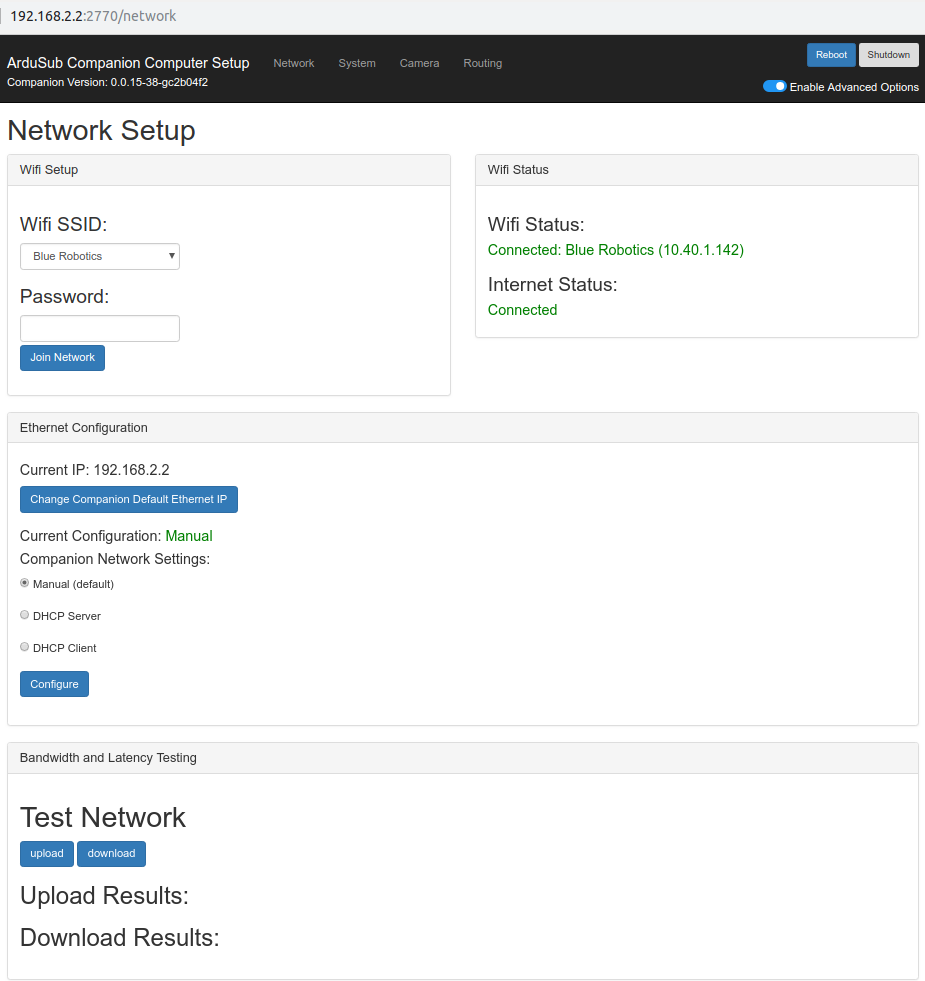
The web interface by default opens at the Network page. This page allows users to:
- Configure WiFi
- Check WiFi and Internet Status
- Configure Ethernet IP address
- Test the network for Uploads and Downloads
- Ethernet network configuration (advanced): The Ethernet interface can be configured as DHCP Server, DHCP Client or Manual (static) mode.
- Manual: Manual: The interface is configured with a static IP address. This is the default configuration. The default IP address is 192.168.2.2.
- DHCP Server: The interface is configured as a DHCP server on the 192.168.2.x subnet. The interface IP address will be 192.168.2.2 in this mode.
- DHCP Client: This is useful for connecting to a router.